01 Add your first repository
Have a local clone ready.
Clone the repository in your usual Git tool and confirm that its remote is accessible. Development builds use your installed Git. The sandboxed store build bundles Git and requests repository access through the system folder picker.
Open the menu bar and choose “Add Monitor”.
Select the local repository, then check one or more remote branches. Each branch tracks changes independently; branches in the same repository share a card. Edit the repository later to add or remove branch selections.
Wait for the first successful check.
The first check establishes a baseline without alerting you about existing commits. Later changes produce one notification and one sound per branch and batch.
02 See who changed what
Collapsed cards show the latest commit for each branch, with its author and commit date. Expand a repository to merge the history of all monitored branches. Shared commits appear once, with their branch labels, ordered newest first by commit time.
The default is 10 entries. Settings accepts 5–20, counted after merging, deduplication and author filtering. Long commit bodies scroll within the history.
Use the card menu to pin, edit, pause, resume or confirm removal. The menu bar distinguishes idle, checking and unread states. Opening the panel marks all updates as read; closing it keeps monitoring active.
Dates come from Git commits, not push or discovery times. Git Knock checks periodically rather than receiving instant push events.
04 Choose your kind of heads-up
Open Settings with the gear button. All repositories share the check interval: 1 minute by default, adjustable to whole minutes from 1 to 60.
Pick a sound
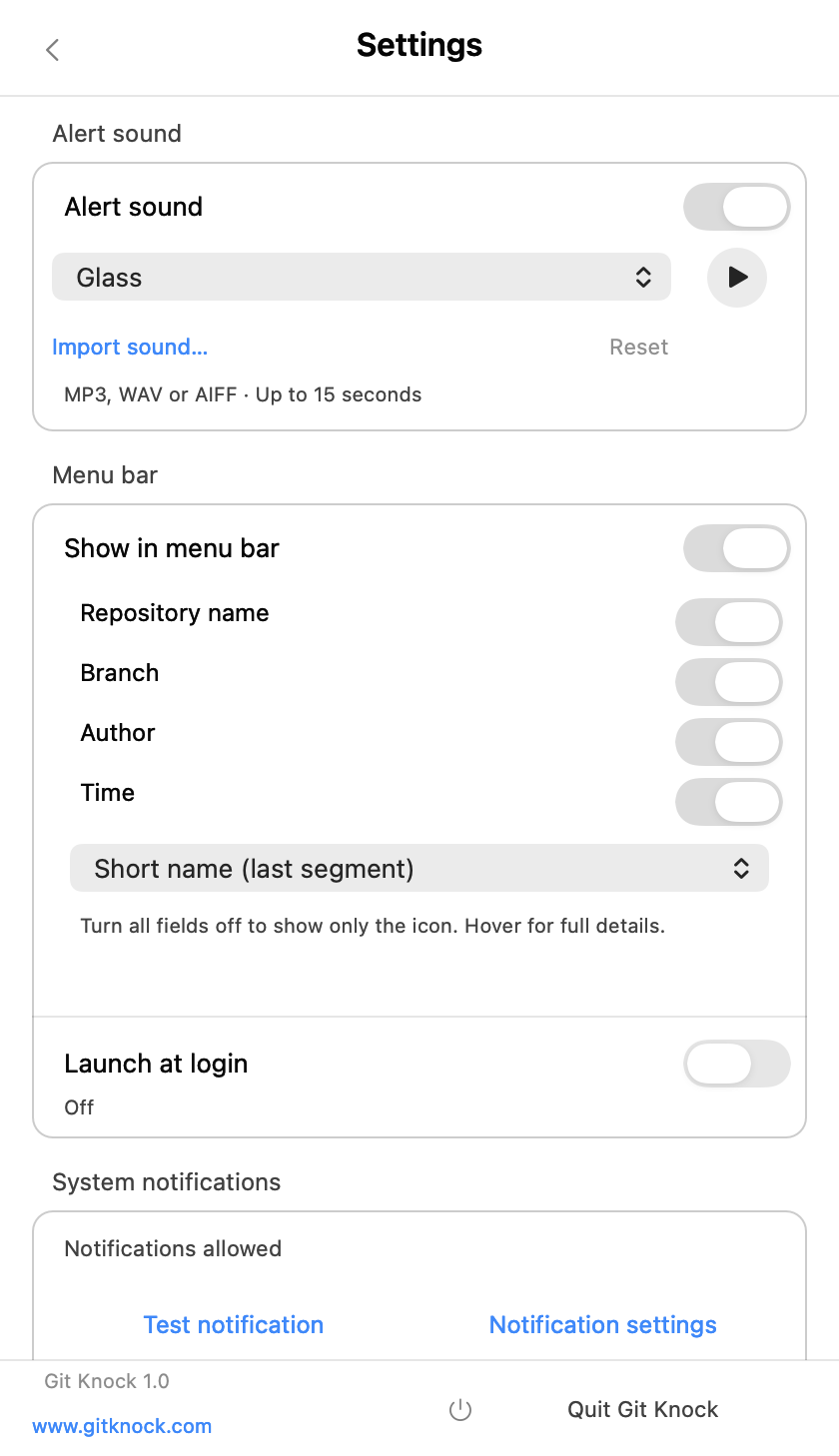
Choose from 14 macOS system sounds or turn automatic sounds off. To import a personal sound, choose an MP3, WAV or AIFF file longer than zero and no more than 15 seconds. Preview it with the play button.
The app saves a local copy. An invalid file or failed import leaves the previous selection intact. Unreadable or unplayable custom sounds fall back to the default. Use recordings or audio you have permission to use; game voice clips are not bundled.
Language and menu bar
Follow the system language, or choose Chinese, English, Korean, Japanese, Spanish, Portuguese, French or German. Unsupported system preferences fall back to English. Repository names and commit text keep their original language.
Enable the latest-commit menu bar display for two lines of context. Choose repository, branch, author and time separately, and use either the last segment or the full branch name. Turn all fields off for an icon-only display; the tooltip retains the full details.
Launch at login and quitting
Launch at login may need approval in macOS System Settings. Closing the panel hides it. “Quit Git Knock” at the bottom of Settings stops monitoring and exits.
05 No heads-up?
Try a test notification and sound.
Send a test notification from Settings. Check macOS notification permission, alert style and Focus mode. A test does not represent a commit and does not play the update sound. Preview the sound separately and check volume and output devices.
SSH access in the store build
For SSH remotes, authorize the existing SSH configuration folder, usually .ssh, under Settings → SSH Configuration. It must already contain a nonempty known_hosts file. Access is read-only: the app does not copy private keys or trust new hosts automatically. HTTPS and local remotes do not need this SSH permission. External keys, proxies and credential helpers must still be accessible within the sandbox.
Check monitoring and the remote connection.
Confirm that the monitor is active and its baseline succeeded. Allow one check interval. For a failed remote connection, run git ls-remote --heads origin in the same repository; replace origin if needed. SSH, proxy and credential issues can affect both branch discovery and checks.
See Support for help, with the app version, macOS version and short reproduction steps.
06 What happens to the repository?
Git Knock fetches selected targets into app-specific Git refs. It does not pull, check out branches, merge, change working files, or update ordinary remote-tracking refs and tags. You decide when to integrate the code.
It reports code changes, not task completion, tests or deployments. History pushed and completely removed between checks may be missed.